
Strategic recruitment for Australia's construction, engineering and insurance sector.
ConstructEng Australia places talent on the largest building and civil developments, and across the insurance sector. With 25+ years in technical and executive recruitment, founder Simon Bloom has built an extensive network of engineers, construction professionals and insurance specialists around the world.
25+ years of recruiting talent around the world.
Founded by Simon Bloom in 2009, ConstructEng Australia grew into a recruitment brand with a LinkedIn network of over 15,000 industry professionals. Simon's own background spans executive search inside Transport for NSW's internal talent acquisition function, supporting senior appointments across its once-in-a-generation $76.7B infrastructure program, through to in-house talent leadership for a global insurer. That network and experience now sit behind every ConstructEng search.
Read more about ConstructEng →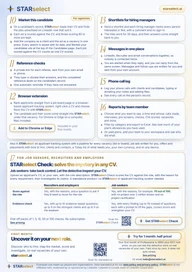
The detective work, done for you.
See the full listSTARselect is an applicant tracking system for agencies and employers, connected to your own LinkedIn: it searches your LinkedIn or LinkedIn Recruiter account, grades everyone it finds against your role description, and sends your connection requests and messages within the limits you set.




Recruit better, faster.
AI that follows our rules, not its mood.
Most AI tools leave every judgement to the AI, so the same resume can score differently from one try to the next. STARselect is different. Our own scoring rules decide what a job is asking for and what counts as met, partly met or not shown, so the AI's job is to read every resume and LinkedIn profile carefully and apply those rules. We tested them over hundreds of runs until the same resume against the same job gave the same score, every time. Every grade comes with its reason, a claim with nothing behind it isn't counted as met, and copying the job advert's wording into a resume doesn't buy a higher score.
- Advertise, search and score
- Outreach and screening
- Interview and offer
- Hired
Today: who replied, emails to answer, who accepted your connection requests and who to message next. Work through them one by one, or tick everyone waiting for a message and message them all at once, each message written for that person.
Recruit better, faster.
AI that follows our rules, not its mood.
Most AI tools leave every judgement to the AI, so the same resume can score differently from one try to the next. STARselect is different. Our own scoring rules decide what a job is asking for and what counts as met, partly met or not shown, so the AI's job is to read every resume and LinkedIn profile carefully and apply those rules. We tested them over hundreds of runs until the same resume against the same job gave the same score, every time. Every grade comes with its reason, a claim with nothing behind it isn't counted as met, and copying the job advert's wording into a resume doesn't buy a higher score.
- Advertise, search and score
- Outreach and screening
- Interview and offer
- Hired
Talk to STARselect
Say what you want and STARselect does it: add a vacancy, run a market map, score someone, or say “message the good fits for the Structural Engineer vacancy” and it ticks them and writes the message, or “send a follow-up to everyone I messaged about this role who hasn’t replied”. In every message window, ask it to write or change the message, typed or spoken.
Swipe for more. Tap a picture to open it, then pinch to zoom.
See Talk to STARselectMap the whole market
Writes the search from your role description and runs it on your own LinkedIn or LinkedIn Recruiter account. Everyone it finds is graded A, B or C with the evidence, best first. Priority search words move the people who mention them up, and a gold Email tag shows who is already in your emails.
Swipe for more. Tap a picture to open it, then pinch to zoom.
How market maps workResearch the market
Searches the public web for the people in a field at the companies you name, or the projects just approved. Every result has its source, anyone already in your system is highlighted, and it all downloads to Excel.
Swipe for more. Tap a picture to open it, then pinch to zoom.
How Research worksScore every applicant
Import up to 300 resumes at once from any job board or system, and score them straight away or later, after a Boolean search. Each is scored out of 100 against your role description: Met, Partly met or Not met, with the reason for every requirement.
Investigate the claims
Investigates the claims in the resumes you choose: what is well backed, what is vague or unsupported, and what is worth checking, with up to 10 fair, open STAR questions to test those claims at interview.
Pre-screens
Send a link by email or text: a short details form, then 4 or 5 questions answered on a phone or computer, typed, spoken or on camera. Each answer is scored out of 5 and summarised against the role.
Swipe for more. Tap a picture to open it, then pinch to zoom.
See pre-screensOne combined document
A branded cover page summing up the score, evidence check and pre-screen answers, then the resume, in one document. Send it to whoever makes the hiring decision.
Swipe for more. Tap a picture to open it, then pinch to zoom.
See the combined documentSTAR interview guides and templates
Tailored interview guides for each candidate, plus ready-made templates for role descriptions, candidate screening and candidate scoring.
Swipe for more. Tap a picture to open it, then pinch to zoom.
See interview guidesReference checks
A private link for each referee, sent from your own email or phone. They type or dictate their answers, the completed reference lands on the candidate’s record, and a reminder goes if they have not answered.
Swipe for more. Tap a picture to open it, then pinch to zoom.
See reference checksAnd more
Find new clients and jobs, shortlists for hiring managers, and your emails and LinkedIn messages together.
Swipe for more. Tap a picture to open it, then pinch to zoom.
See what STARselect doesSTARselect Check
For recruiters, employers and job seekers: let the detective inspect any resume. Check a resume against a role description and, in seconds, get a score and constructive feedback on its strong claims, its weak claims and any inconsistencies. Job seekers can then let STARselect guide them: it asks for the detail behind each finding, highlights that line in their resume beside it and writes their answers into their resume, and they can edit their resume themselves as they go. Then they score it again against the same job, to see the improvement. No job advert yet? STARselect Match sets up their job board searches, free, and finds current job ads where their resume already scores 60% or more, before you've improved it. From A$2.50 a check, paid once, no subscription and no applicant tracking system needed.
Swipe for more. Tap a picture to open it, then pinch to zoom.
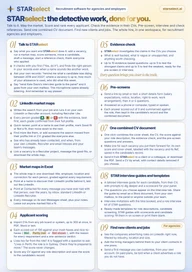
- 01Talk to STARselectSay what you want and STARselect does it: add a vacancy, run a market map, score someone, or say “message the good fits for the Structural Engineer vacancy” and it ticks them and writes the message, or “send a follow-up to everyone I messaged about this role who hasn’t replied”. In every message window, ask it to write or change the message, typed or spoken.
- 02TodayYour day in order: who replied, the emails to answer, who accepted your connection requests, the good fits to message and the follow-ups due, each with their photo. Work through them one at a time, or tick everyone in a box and message them all at once, each message written for that person.
- 03LinkedIn searchWrites the search from your role description and runs it on your own LinkedIn or LinkedIn Recruiter account. Everyone it finds is graded A, B or C with the evidence, best first. Priority search words move the people who mention them up, and a gold Email tag shows who is already in your emails.
- 04LinkedIn outreachSend connection requests with a note, LinkedIn messages and Recruiter InMail from your own account, within the limits you set. Message one person, or a whole list at once: everyone gets their own message, with their name and a line written from their own profile, and you read each one before it goes. A message can wait for each person to accept your request, and Already messaged about this role shows who has been asked. Every reply comes back to Messages and the person’s record.
- 05Market maps in ExcelDownload the whole map: title, employer, location and connection for each person, graded against every requirement, with your message history and notes on their own sheets. Upload your own edited map, or one a colleague gave you, and it’s kept with the vacancy.
- 06Emails and LinkedIn messagesYour emails, LinkedIn and LinkedIn Recruiter messages together, right in front of you. Messages you send in LinkedIn itself mark the person as Contacted on the market map, and a message can wait for each person to accept your connection request. Get alerted when someone replies, and reply from the same screen.
- 07RemindersRight-click anything, a candidate, a client, a message or a vacancy, and set a reminder, or just ask Talk to STARselect for one. Your reminders and interviews sit in a calendar with a dot on each busy day, with your notifications beside them. Each one opens what it’s about. When it’s due: a card with a sound, a desktop notification, a line on Today, and an email if it’s still waiting. Share anyone’s profile with a client in one click.
- 08ResearchSearches the public web for the people in a field at the companies you name, or the projects just approved. Every result has its source, anyone already in your system is highlighted, and it all downloads to Excel.
- 09Find new clients and jobsSee the companies advertising roles right now, by industry, location and size. Add the hiring managers behind them to your client contacts in one press. Grow your LinkedIn network: find people on standard LinkedIn by title, industry and employer, and send connection requests with a note.
- 10Market this candidateFor agencies: STARselect reads a candidate’s resume, finds the jobs advertised now on LinkedIn and the job boards, and shows those scoring 80% or more. Add the company as a client and the ad as a vacancy in one press.
- 11Applicant scoringImport up to 300 resumes at once from any job board or system, and score them straight away or later, after a Boolean search. Each is scored out of 100 against your role description: Met, Partly met or Not met, with the reason for every requirement.
- 12Evidence checkInvestigates the claims in the resumes you choose: what is well backed, what is vague or unsupported, and what is worth checking, with up to 10 fair, open STAR questions to test those claims at interview.
- 13Pre-screensSend a link by email or text: a short details form, then 4 or 5 questions answered on a phone or computer, typed, spoken or on camera. Each answer is scored out of 5 and summarised against the role.
- 14One combined resume documentA branded cover page summing up the score, evidence check and pre-screen answers, then the resume, in one document. Send it to whoever makes the hiring decision.
- 15STAR interview guides and templatesTailored interview guides for each candidate, plus ready-made templates for role descriptions, candidate screening and candidate scoring.
- 16Shortlists for hiring managersSend a shortlist and each hiring manager marks every person Interested or Not, with a comment and no sign-in. The links work for 30 days, and their answers come straight back to you.
- 17Reference checksA private link for each referee, sent from your own email or phone. They type or dictate their answers, the completed reference lands on the candidate’s record, and a reminder goes if they have not answered.
- 18Browser extensionRank applicants straight from a job board page or a browser-based applicant tracking system: open the application, then right-click the page and choose Rank this page with STARselect (or right-click the link to their resume and choose Rank this CV).
What clients say.
“I would like to personally acknowledge your recent efforts and contribution in all of the recruitment activities you have undertaken and are currently undertaking for our branch. Your experience, organisation, forward planning and prompt actioning of requests has made it a delight working with you and our branch is securing quality talent as a result. Your approach is highly professional and it is worth recognising as it is the best recruitment service I have personally experienced and my team are also highly complementary. So, we thank you!”
“Simon is a great talent specialist who has helped me find key resources for project leadership roles.”
“Simon's network within the infrastructure and construction industries is second to none. He brought deep industry insight to both the internal clients he worked with along with candidates, and was highly valued by all.”
“Simon gets results! Simon recently led executive recruitment for a full team of high performing executives with great outcomes and excellent communication throughout. He is one of the most efficient and professional executive recruiters I have worked with.”
“Simon is an excellent recruiter. He is well networked in the engineering industry and always provides high calibre candidates. I can think of 5 key long-term members of my team sourced by Simon.”
“Simon is a fantastic recruitment partner. He has helped me find some exceptional talent for key leadership roles through advertising and his own professional networks. He is uber professional, efficient, focused on helping drive organisational outcomes (e.g. inclusion & diversity outcomes), action oriented and is fun to work with.”